.

Showing posts with label Mozilla Firefox. Show all posts

Dec 27, 2009

Make invisible/secret icon in Windows 7 Taskbar

taskbar Its been a year or more while I started using Windows 7 and officially it was launched few months ago. Anyways, you might have seen the simplicity and usefulness of this dock type taskbar. Even this dock is quite easy to launch programs and if you have not used it then head on to my previous posts 12 days with Windows 7, also see 10-great kick-ass features to get excited about in Windows 7 where I have mentioned about this super-bar.

In order to make a secret icon in task bar, first of all it needs to be invisible and only the person who made it should know the location, in order to use it. Ok now lets begin with making invisible icons, so how to make a program’s icon invisible ?

Sep 4, 2009

Add Bing Search Engine to Firefox Search Box

As Bing is getting popular now-a-days and many people have started using this as their default search engine, adding Microsoft Bing search engine to your firefox would be great  deal to save your time and make searching faster. We need to add Bing Search engine extension for Firefox to do this.
  
Add Bing Search Engine to Firefox Search Box :
1. To start searching on Bing from your Firefox browser itself, you need to install Bing Search plugin for Firefox on your browser.
2. After the installation you will get Bing search engine option activated.
3. Simply select Bing as your default search engine.
4. You are done.

Now you don’t have to visit Bing’s homepage to make searches, navigate to the Firefox inbuilt search box and search with your queries!

Jan 14, 2009

Firefly - Add-on to use Mozilla as File Explorer

Ever tried to view files stored on system in Mozilla Firefox, to save time or not willing to open windows explorer...!...You can open all files in it, but can't do file operations like copying , deleting, moving or ever watching preview of videos,music and other files in it. Don't worry you can do all these by installing an Add-on Firefly.

Monitors Pages for Activity - Check4Change

Firefox only (Windows/Mac/Linux): Check4Change is a simple Firefox extension that monitors web-pages for changes at a user-determined interval.
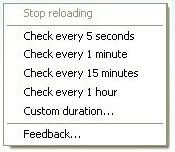
Once installed, you can select and right-click text on any page, then simply choose a time interval for refresh. When a change occurs, the following notifications occur based on your preferences:
  • The tab icon becomes a little dancing C4C emblem.
  • A pop-up notification occurs.
  • A sound plays.
  • Check4Change only works on open tabs.
If you need to monitor a page for change over the long term, it isn't effective to keep the tabs open for every page you want to monitor. Check out Firefox extension Update Scanner to keep tabs on site changes over time. Check4Change is a free Firefox extension, works wherever Firefox does.


Get it from Here.